
Run Your Pipeline From First Contact to Signed Deal
Track every opportunity, build the proposal without leaving it, and close the deal the moment your customer signs, no re-entry, no separate document, no manual pipeline updates.
The strategic case for one pipeline, not three
Most deals don't fall apart because the work was priced wrong. They fall apart because the deal lived in three different places, a CRM for the lead, a document for the proposal, a spreadsheet for tracking who signed what, and none of them agreed with each other by the time someone asked "so where are we with this one?"
Keeping the opportunity, the proposal, and the signature in one continuous record instead of three disconnected tools means the pipeline is never stale, because there's nothing separate left to fall out of sync with it.
- Faster proposals: Build directly from the opportunity, no switching tools or re-typing what's already on record.
- Fewer stalled deals: A live Lead Inbox and Triage view surface what needs attention today, not whatever happened to get looked at.
- Accurate pipeline, always: A signed proposal closes the deal automatically, nobody has to remember to update a stage by hand.
- One record, start to finish: The opportunity, the proposal, and the signed document are all the same record, not three things that have to be reconciled later.
Track every deal in the view that matches how you actually work
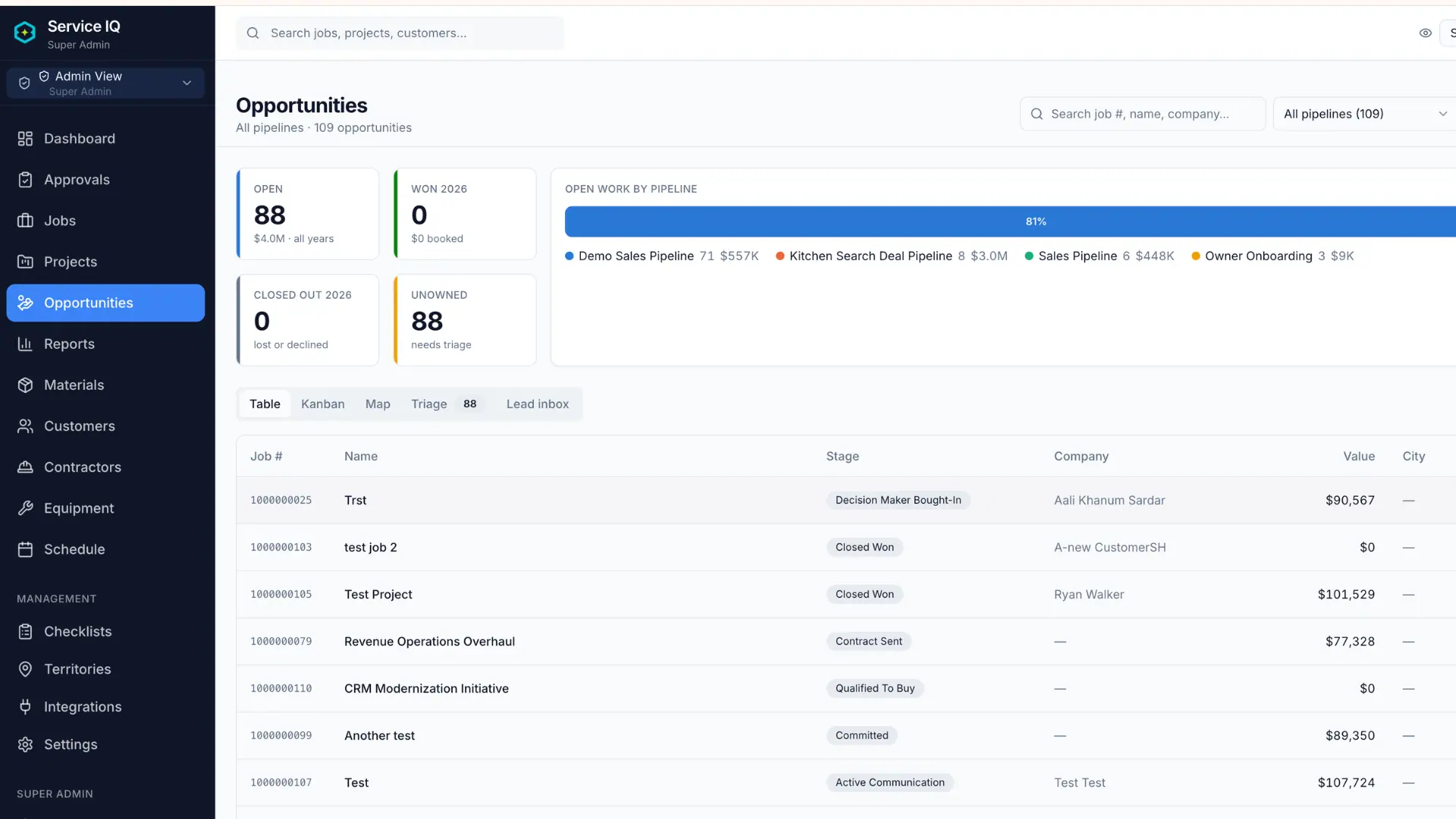
Table, Kanban, Map, or Triage, switch views without switching tools. A dedicated Lead Inbox catches new business the moment it comes in, and instant search by job number, company, owner, or address means never scrolling to find a deal you already know exists.
Table View
Every deal's details laid out in sortable rows, for anyone who thinks in spreadsheets.
Kanban View
Drag a deal from stage to stage, the way most people already picture a pipeline moving.
Map & Triage Views
See deals geographically, or sorted by what actually needs attention today.
How an opportunity moves through the pipeline
An opportunity moves through whatever stages your pipeline defines, there's no universal sequence baked in, and a deal can move directly between any two stages in a single write. Entering through the Lead Inbox creates the opportunity at the pipeline's first stage; qualifying it moves it forward and makes it visible across every view, not just the one it was entered in.
- Live summary, not a cached count: The pipeline health summary recalculates against whatever filter is currently applied, so it always matches what's on screen.
- Required fields gate the move: A move into a stage that's missing information it requires is refused, naming exactly what's missing, so it can be collected and the move retried in the same motion.
- Search spans every field: Job number, company, owner, and address are all indexed together, so a partial match on any of them surfaces the right deal.
Scope, price, and terms, guided, saved, and ready to send
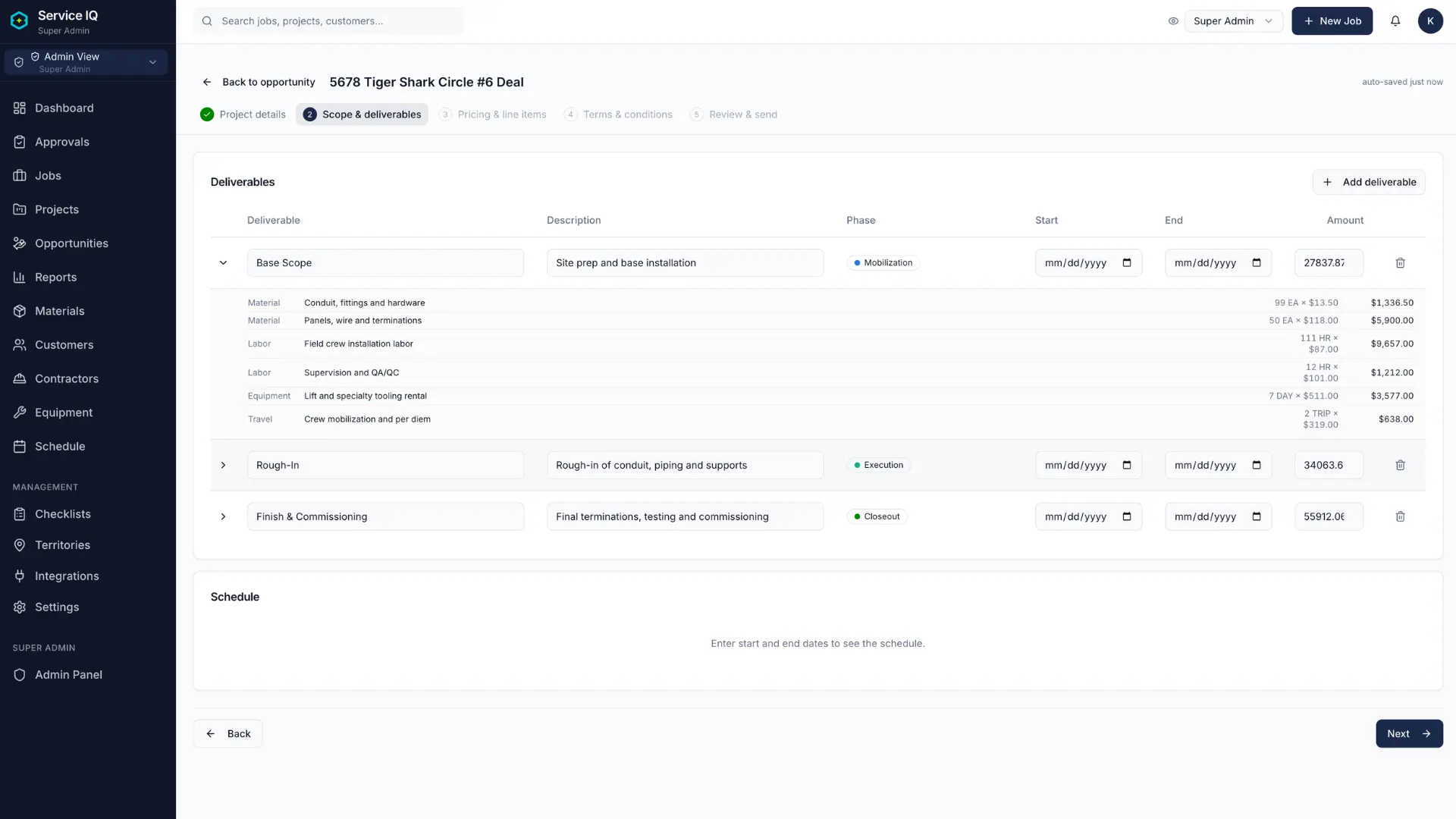
A step-by-step wizard walks through scope, pricing, and terms in order, so nothing gets skipped in a rush. AI-assisted pricing splits your contract total across the line items so pricing starts filled in, not blank, and every number stays editable before it goes out the door. Everything saves automatically as you go.
Guided Steps
Scope, pricing, and terms built in sequence, from the opportunity itself.
AI-Assisted Pricing
Suggestions split your contract total across the line items, so you're not starting from a blank pricing grid.
Autosave
Get pulled away mid-proposal, and it's exactly where you left it.
How a proposal stays stable once it's sent
A proposal in progress is a private draft tied to its parent opportunity, invisible to the customer, editable freely until it's sent. Sending locks it permanently: what the customer is reviewing never changes underneath them. Need to make a change afterward? That goes out as a new, separately numbered proposal, not an edit to the one they already received, the same principle that governs submittal revisions elsewhere on the platform, just implemented as a fresh document rather than a new revision of the same one.
- Draft state is private: A proposal stays invisible to the customer until it's explicitly sent.
- Sending locks the proposal: Once sent, that proposal's content never changes again, a correction goes out as a new, separately numbered proposal instead of an edit to the original.
- AI suggestions stay editable: Pricing suggestions fill in the numbers so you're not starting from blank, but every field stays open to adjust before you send.
Your customer signs, the deal closes itself
Send a polished, branded PDF with one click. Your customer reviews and signs electronically, no account required, no app to download. The moment they sign, the opportunity moves to Closed Won automatically.
- Branded, one-click send: A professional PDF, sent directly from the opportunity, no separate export step.
- No-account signing: Your customer signs from a link. Nothing to install, nothing to register for.
- Automatic close: Signature triggers the stage change. Nobody has to remember to update it by hand.
How a signed proposal writes itself back into the record
Sending a proposal for signature generates a secure, single-purpose token link, the same pattern used for external RFI and submittal approvals elsewhere on the platform. The link tracks whether it's been opened, captures the signature and timestamp, and writes the signed document back into the opportunity's record automatically. No shared credentials, no account creation, and the signed proposal becomes part of the permanent record the same way an approved submittal does.
- Token-based access: Each recipient gets a unique, expiring link.
- View tracking: Know whether the proposal's been opened before following up.
- Signature triggers the close: A captured signature is what actually moves the deal to Closed Won, not a manual update after the fact.
Discover Other Features
Explore the rest of the ServiceIQ platform.
Project Governance
RFIs, submittals, drawings, and audit trails for every project.
Learn moreJob Management
Scheduling, kanban pipelines, time tracking, and customer updates.
Learn moreTeam Coordination
Contractors, multi-user assignments, roles, and partner access.
Learn moreHubSpot Integration
Bi-directional sync for deals, contacts, line items, and contractors.
Learn moreRun a Real Deal Through It, Start to Finish
No card, no training, no consultant call. Load your own pipeline and watch a deal move from first contact to signed.